anchors
Eleòra Anchors
A lightweight extension for Chromium-based browsers, designed for fast bookmark navigation and essential browser utilities — all in one clean popup.



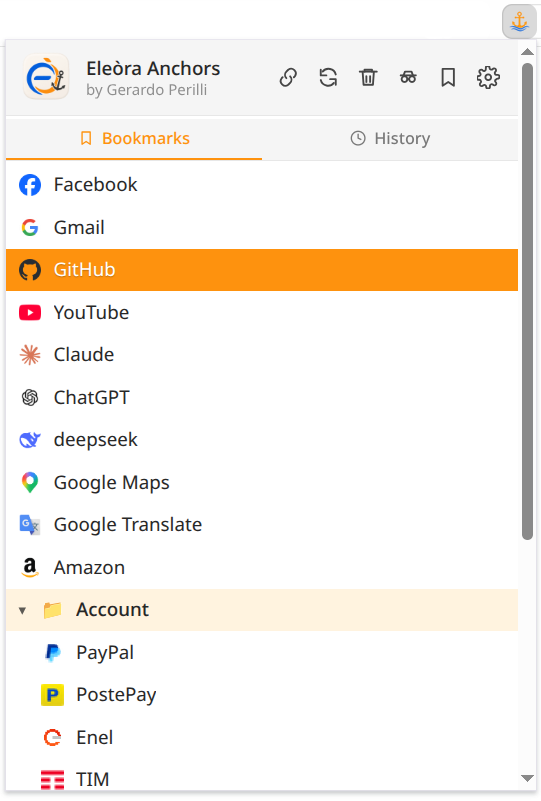
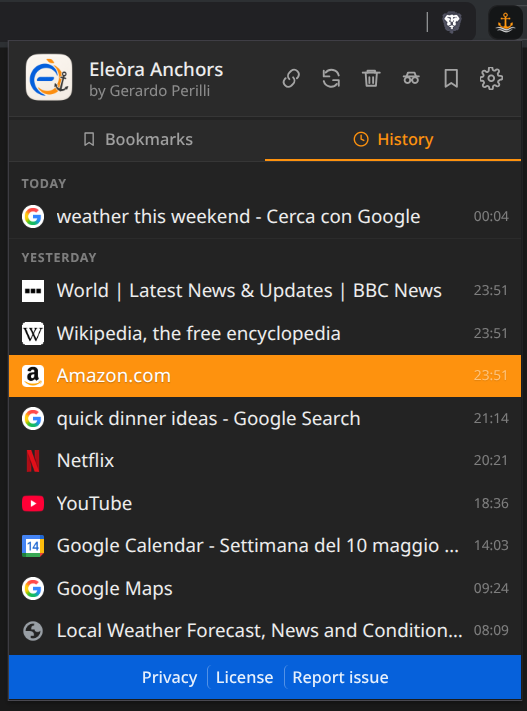
Screenshot
| Light | Dark |
|---|---|
 |
 |
Features
- Bookmarks — browse and navigate your bookmark tree instantly
- History — browse recent browsing history grouped by day, with per-item timestamps
- Clean reload — clear cache for the current site and reload
- Clear data — remove cache, history, downloads, form data and local storage (cookies excluded)
- Copy sanitized URL — copy the current page URL without tracking parameters
- Incognito / InPrivate — open a new private window in one click (terminology adapts to the browser)
- Bookmarks manager — quick access to the browser’s bookmarks page
- Settings — quick access to browser settings
- Context menu — right-click bookmarks to open in different ways
- Keyboard navigation — support for arrows, Enter and Escape
- Dark mode — automatic via system preferences
- Bilingual — English and Italian, auto-detected from browser language
Important notes
-
Clear data removes:
- cache
- browsing history
- downloads list
- form data
- IndexedDB / localStorage / service workers
Cookies are NOT removed, so you stay logged in.
-
Clean reload only clears cache for the current site, not globally.
-
Some pages (e.g.
chrome://,file://, extension pages) cannot be cleaned — in those cases, a normal reload is performed. -
To use the extension inside incognito/private mode, you need to enable it manually in your browser settings. This is disabled by default by Chromium-based browsers.
How it works
- Bookmarks are read using the browser’s native
chrome.bookmarksAPI - Browsing history is read using the browser’s native
chrome.historyAPI - Favicons are retrieved via the browser’s internal
_faviconendpoint - URL cleaning removes known tracking parameters (UTM, click IDs, affiliate IDs, etc.)
- All operations run locally inside your browser
Permissions explained
bookmarks→ read and display bookmarks in the popuphistory→ read and display recent browsing history in the popuptabs→ access the current tab URL when neededwindows→ open new browser windows, including incognito/private windowsbrowsingData→ clear cache and selected browsing dataclipboardWrite→ copy sanitized URLs to the clipboardfavicon→ display site icons next to bookmarks
Compatibility
- ✔ Chrome
- ✔ Brave
- ✔ Edge
- ✔ Opera
- ✖ Firefox not supported
Keyboard shortcuts
↑ / ↓→ navigate items (works in both Bookmarks and History tabs)Enter→ open the selected itemCtrl + Click→ open in a new tab (works in both tabs)Esc→ close the context menu
Privacy
No data collection, no analytics, no tracking, no external servers.
- No external network requests are performed
- No browsing data is sent outside your browser
- No bookmarks, URLs or clipboard contents are stored by the extension
- No third-party services are used
Full privacy policy: https://eleora-dev.github.io/anchors/privacy.html
Installation
Chrome Web Store
Install Eleòra Anchors from the Chrome Web Store
Manual installation
- Download or clone this repository
- Open your browser’s extensions page:
- Chrome / Brave / Opera:
chrome://extensions/ - Edge:
edge://extensions/
- Chrome / Brave / Opera:
- Enable Developer mode
- Click Load unpacked and select the project folder
License
MIT License — see LICENSE
Author
Gerardo Perilli · Eleòra