charm
Eleòra CharM
A lightweight emoji and special character picker for Linux/KDE.




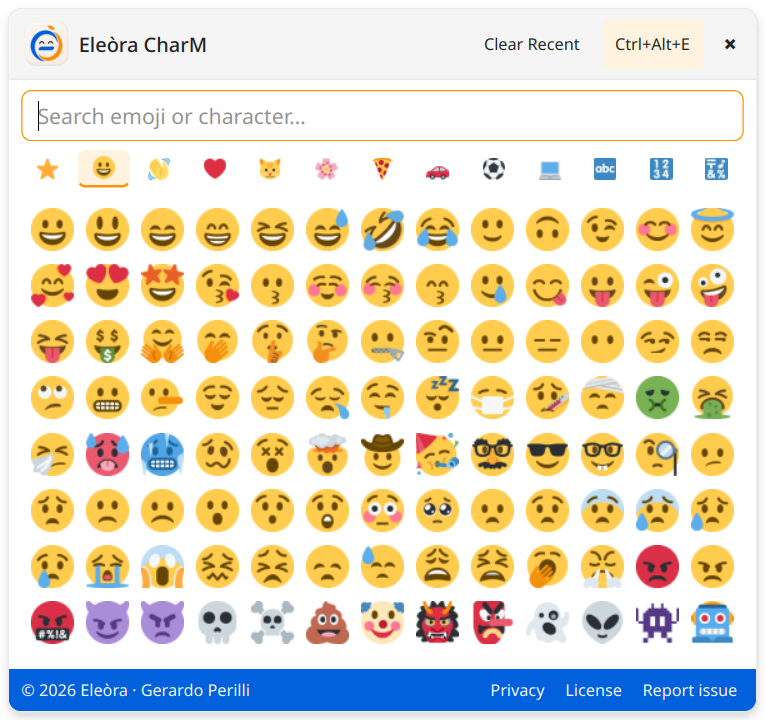
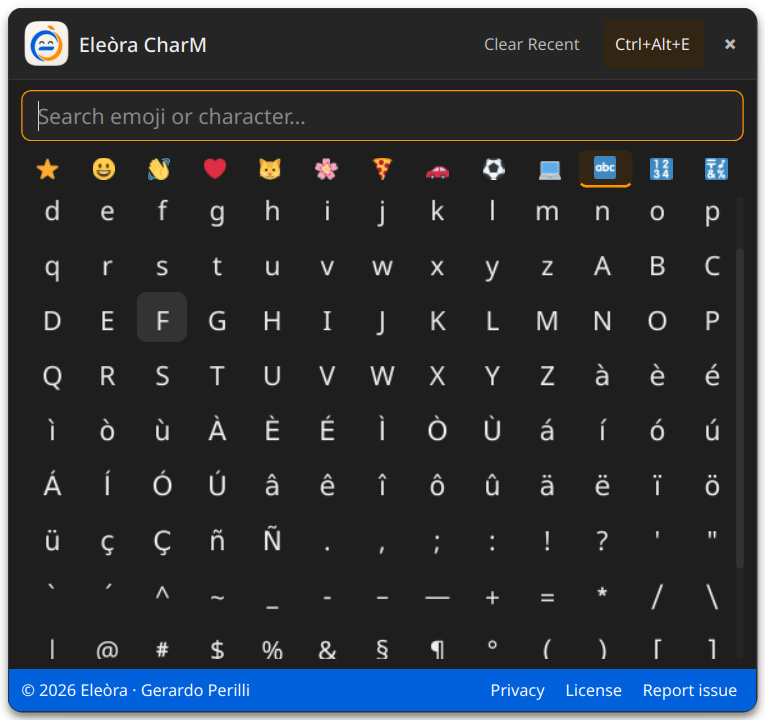
Screenshot
| Light | Dark |
|---|---|
 |
 |
Features
- Emoji picker — browse emoji grouped by category: smileys, gestures, hearts, animals, nature, food, vehicles, sport and objects
- Special characters — includes Latin accents, punctuation, math symbols, arrows, Greek letters, currency symbols and typography marks
- Search — search by Unicode name or by the character itself
- Recents — recently used characters are kept locally and can be cleared from the UI
- Clipboard copy — selected characters are copied to the clipboard
- Auto-paste on X11 — optionally pastes directly into the previously focused window through
xdotool - Wayland-friendly mode — works through the clipboard;
--showcan be used from a KDE custom shortcut - Global hotkey —
Ctrl+Alt+Eopens or closes the picker whenpynputis available - System tray — quick access, paste method status and quit action
- Local Twemoji rendering — uses local PNG assets for reliable color emoji rendering on Linux/KDE
- Unicode font fallback — text symbols are rendered with installed symbol/math fonts such as Noto Sans Symbols or Noto Sans Math
- Bilingual UI — Italian and English, auto-detected from the system locale
- Light/dark styling — adapts to the active Qt/KDE palette at startup
Important notes
-
Local Twemoji assets are required. Place the PNG files in:
./assets/twemoji/*.pngYou can check missing assets with:
python charm.py --check-assets -
Theme colors are evaluated at startup. Restart CharM after changing the KDE color scheme.
-
Global hotkey support is optional. If
pynputis not installed, CharM still works from the tray or withpython charm.py --show. - Auto-paste depends on the session.
- On X11, CharM can paste directly using
xdotool. - On Wayland, CharM copies to the clipboard by default. Configure a KDE custom shortcut that runs
python /path/to/charm.py --show.
- On X11, CharM can paste directly using
- Special symbols need Unicode fonts. On Fedora, the recommended packages are Noto Sans Symbols, Noto Sans Symbols 2 and Noto Sans Math.
How it works
- CharM runs as a tray application and does not quit when the picker window closes
- Selecting an item copies the character to the clipboard
- Recent characters are stored locally in
~/.config/eleora-charm/recent.json - Preferences are stored locally in
~/.config/eleora-charm/config.json - A per-user Unix socket in
/tmp/eleora-charm_<uid>.sockis used only to show the already-running instance when--showis called - No root privileges are required
- No analytics, tracking or background network requests are performed
Requirements
- Linux
- KDE Plasma recommended
- Python 3.10+
- PySide6
- Local Twemoji PNG assets
- Noto symbol fonts recommended
pynput(optional — global hotkey)xdotool(optional — direct auto-paste on X11)ydotool(optional — simulated paste on Wayland setups where it is configured and available)
Installation
git clone https://github.com/eleora-dev/charm.git
cd charm
pip install PySide6 pynput --break-system-packages
sudo dnf install google-noto-sans-symbols-fonts google-noto-sans-symbols-2-fonts google-noto-sans-math-fonts
sudo dnf install xdotool
python charm.py
If you do not want the global hotkey, pynput can be omitted.
Autostart
Copy the desktop file to KDE autostart:
cp emoji_picker.desktop ~/.config/autostart/
Or start manually:
python charm.py
Keyboard shortcuts
Ctrl+Alt+E→ open/close picker when the global hotkey listener is availableEsc→ close the pickerEnter→ select the first search result
On Wayland/KDE, add a custom shortcut in:
System Settings → Shortcuts → Custom Shortcuts
Use this command:
python /path/to/charm.py --show
Command-line options
python charm.py --show
Shows the already-running picker instance, or starts normally if no instance is running.
python charm.py --check-assets
Checks whether all required local Twemoji PNG assets are present.
Privacy
CharM does not collect, transmit or share personal data. It stores only local preferences and recent characters on your device.
Full privacy policy: eleora-dev.github.io/charm/privacy.html
Third-party assets
CharM uses local emoji graphics from Twemoji.
Twemoji graphics are licensed under CC-BY 4.0. Twemoji code is licensed under the MIT License.
Copyright Twitter, Inc. and other contributors.
License
MIT License — see LICENSE for details.
Author
Gerardo Perilli · Eleòra